

Case Study Vehicle Previews Enhancements
ROLE
Sr. Product Designer
TEAM
1 PM
3 Engineers
TIMELINE
6 months
SKILLS
User interviews
Surveys
Wireframing
Prototyping
User Testing
TOOLS
Figma
FullStory
Optimal Workshop
CONTEXT
CarMax Auctions is CarMax’s wholesale auction business that sells vehicles to licensed auto dealers rather than retail customers. It runs dealer-only auctions, often both in-person and online, where dealers can browse inventory, review condition details, and bid to purchase vehicles.
The CarMax Auctions site average time on page per car increased from 3 to 5 minutes for users previewing vehicles. My goal was to optimize the preview experience to lower the average time spent per car, enabling users to explore more vehicles efficiently.
PROBLEM
Users were spending more time previewing a single vehicle. Our analytics showed that power users and non-power users both increased their relative previewing average by 1-2 minutes
WHY IT MATTERED
Wholesale vehicle inventory is released a few days before the auction. The more time a user spends previewing a single vehicle, the fewer total vehicles they can preview.
The increase in time reflected the lack of confidence users (dealers) had in the vehicle photos and information being displayed.
CONSTRAINTS
Timeline: Needed to test & release within 6 months.
Technical constraints: Backend infrastructure had limited flexibility due to legacy code.
DISCOVERY
Conducted 4 usability tests, interviewed 10 dealers, and surveyed 100+ users
Heatmaps showed users clicking arrows buttons multiple times to preview vehicle photos
Users would click and enlarge vehicle photos to preview and assess exterior damage
Key takeaways

Rage clicking
Heat maps showed 15-20 consecutive clicks on the navigation arrows.

Expanding to fullscreen
Users enlarged vehicle images to closely inspect exterior damage.

Time on page
Power users averaged 1-2 minutes, non-power users
3-5 minutes per vehicle.

Photo order matters
Users navigate to specific photos to assess damage.
IDEATION
Based on the insights, I generated and prioritized the following potential solution:

MINIMIZING OBSTACLES
Minimizing obstacles and friction points while dealers preview vehicle photos in online auctions helps them evaluate inventory faster and with more confidence. A cleaner photo viewing flow that reduces unnecessary clicks and prevents dead ends lowers the chance of rage clicks, which often signal confusion, lag, or missing controls.
When navigation is intuitive, images load quickly, and key actions are always within reach, dealers stay focused on assessing condition instead of fighting the interface. The result is a smoother experience that can increase engagement, reduce drop-offs, and support quicker bid decisions.
INTUITIVE PREVIEW
Enhanced photo functionality can make vehicle previewing feel faster and more precise by improving how dealers zoom into images. Introducing a hover zoom interaction lets dealers inspect details instantly without clicking to open a separate lightbox, which reduces extra steps and keeps them in the flow of evaluating condition.
By eliminating the need to enter and exit a modal just to enlarge a photo, dealers can scan more images with fewer clicks and less interruption. The result is a smoother, more efficient experience that supports quicker, more confident bidding decisions.
CURRENT FLOW
UPDATED FLOW
SOLUTION & DESIGN
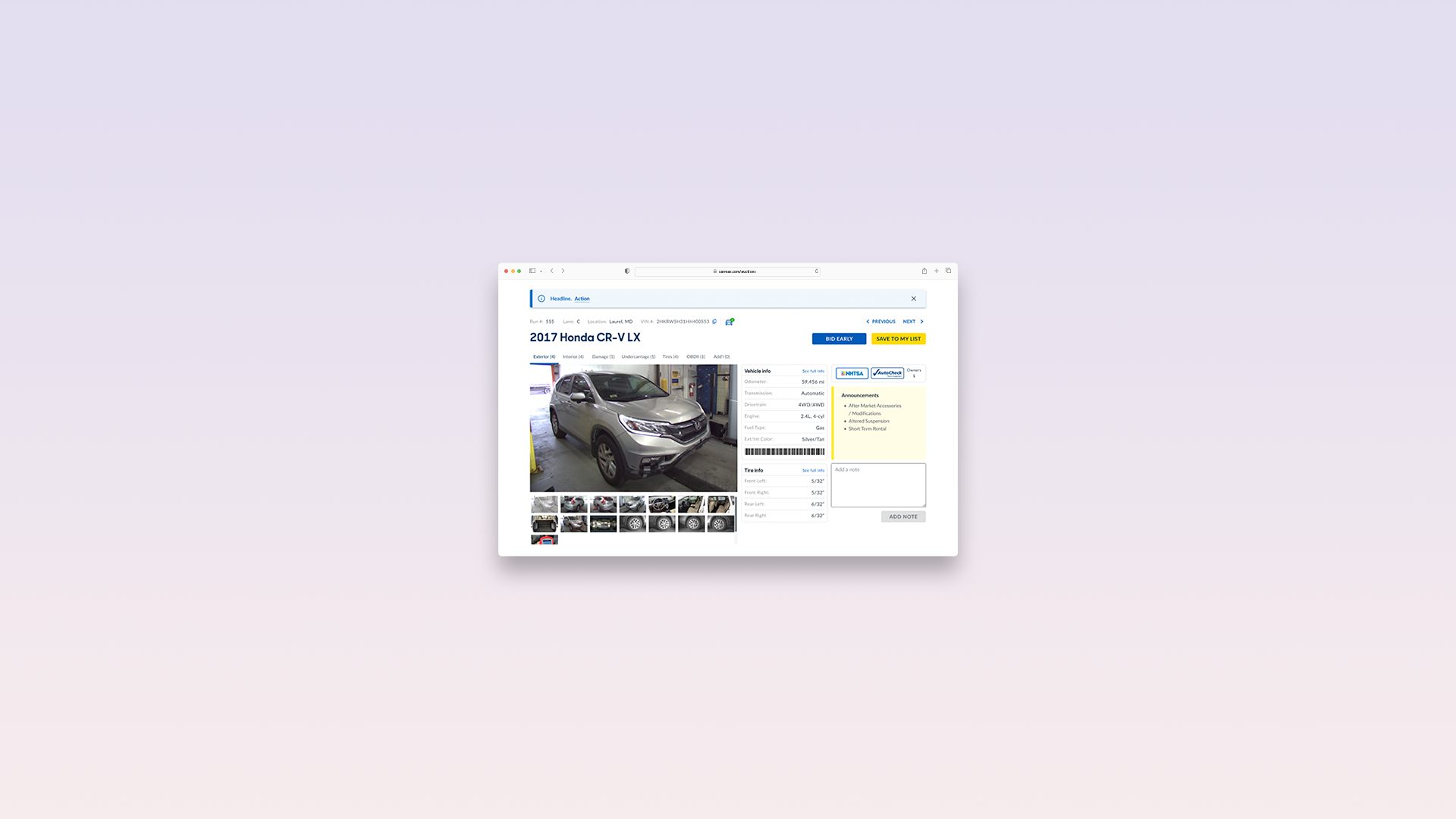
Implementing a hover zoom interaction helps dealers inspect vehicle details instantly without interrupting their flow. Instead of clicking into a lightbox and then closing it repeatedly, dealers can quickly scan paint quality, tread depth, interior wear, and small defects directly from the vehicle page with fewer steps. This reduces unnecessary clicks and keeps attention focused on evaluating condition, not navigating the UI.
Adding clear image categories like Exterior, Interior, Undercarriage, Tires, and Damage makes photo sets easier to browse and compare. Dealers can jump to the most relevant section immediately, spend less time hunting through long photo strips, and build confidence in the vehicle faster. Together, hover zoom and categorization create a smoother preview experience that supports quicker, more informed bidding decisions.
OLD DESIGN
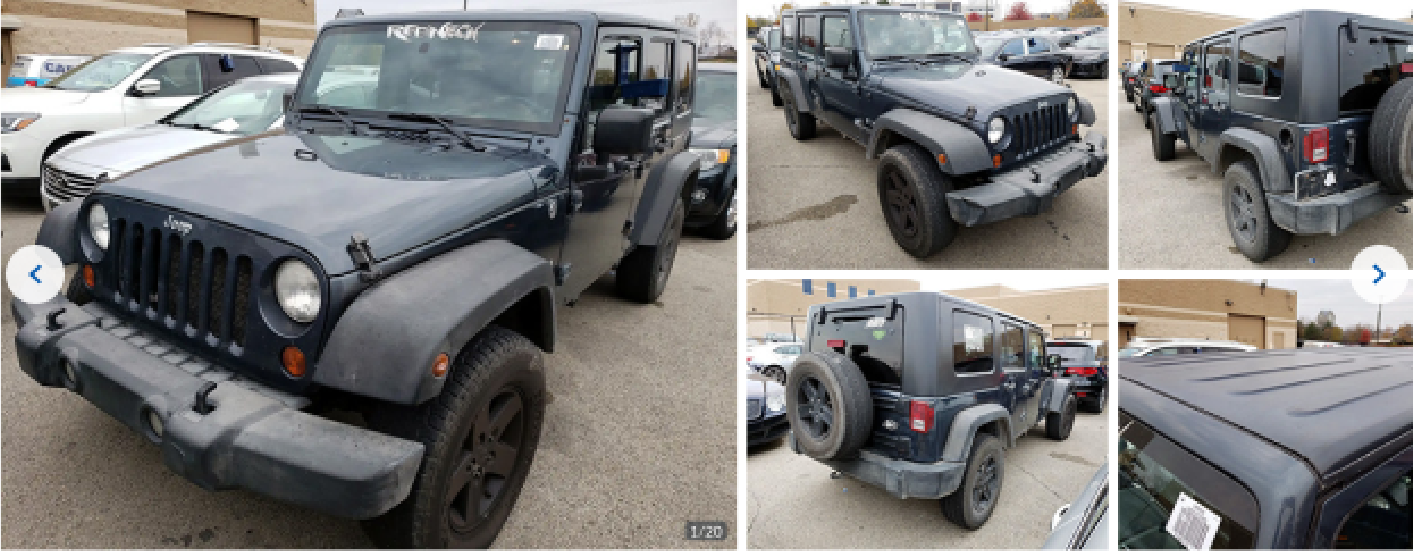
Users clicked the left arrow button frequently to navigate to specific photos in the gallery. The end of the gallery primarily consisted of photos of vehicle damage, and the vehicles undercarriage.
NEW DESIGN
OPTIMIZATIONS
Photo groups (exterior, interior, etc.) give users the ability to navigate directly to specific photos, reducing clicks.
Displaying all photos as a thumbnail, allows users to briefly preview all available photos
On hover zoom to let dealers evaluate and inspect each photo clearly
Re-orienting the arrow buttons for dealers who favor the old functionality
RESULTS
What worked well
Optimizing the vehicle photo experience led to users preview cars more quickly, increasing the average number of vehicles seen by both power and non-power users.
Users previewing more cars, increased overall engagement (likes, saves, notes, etc.) and bids.
Received positive feedback from users about how intuitive the zoom feature was
Photo groups and thumbnails helped users navigate to specific photos quickly
Conclusion and next steps
Survey & track users for feedback on new changes
Iterate and scale to 100%